

[in the process of updating this for Silverlight 2.0 beta]
Come with me on my journey of discovery of the new SilverLight technology.
I’ll be learning by doing. I’ll create a full blown SilverLight application from ground up and share every step of the journey with you.
Everything i learn i will post right here in my blog and i’ll file it under the category “Project SilverLight 1.1”
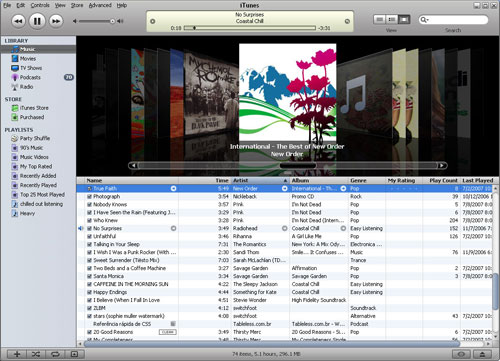
The “End Goal” of this project is to recreate iTunes as a silverlight / ajax.asp.net application
Below is a picture of Apple’s iTunes application:
The “project silverlight 1.1” is currently at this point, note that the wireframe is shown in a “standard metallic” theme taken from step (18) below. [clicking the picture will take you to the working sample]

Here is another version of the wire-frame using the “5 minute wooden” theme taken from step (18) below. [clicking the picture will take you to the working sample]

Enjoy AdvertBoy/LiquidBoy!
Index of all my posts relating the the development of the iTunes like application
1) Project SilverLight 1.1 – the beginning
I talk about the scope of the project and the reasons for the project
2) Project SilverLight 1.1 – Inception & High level design
The title says it all. A high level overview of what im hoping to build and get out of this project.
3) Project SilverLight 1.1 – Prototype – Part 1
A quick look at iTunes and what i want to eventually build.
4) Project SilverLight 1.1 – Prototype – Part 2
I need to prove to myself that i can accomplish the iTunes app using three types of components (general html controls, ajax asp.net controls and silverlight controls)
5) Project SilverLight 1.1 – Prototype – Part 3
I want true async page part refreshes (using update panels) rather than full page refreshes.
6) Project SilverLight 1.1 – Prototype – Part 4
Prove that the communication pathway’s between controls and page can actually be handled by the technologies im using.
7) Project SilverLight 1.1 – Prototype – Part 5
Wireframe of the proposed iTunes like application
8 ) Project SilverLight 1.1 – Prototype – Part 6 – ASP.NET BasePage
Prototype the Base web page with place holders for all the proposed controls.
9) Project SilverLight 1.1 – Prototype – Part 7 – Media Playback Control
I walk through my first SilverLight control, the media player control. I create it using blend and embed it into the webpage created from posting (8) above.
10) Project SilverLight 1.1 – Prototype – Part 8 – Media Display control
In this post i will create the media display, the area where we give feedback on what song is playing and the point that the song is at.
11) Project SilverLight 1.1 – Prototype – Part 9 – View + Search Controls
In this post i create 2 new controls, the search control and the view control. I did both because i was so excited from the previous post i worked twice as hard to get this post complete!
12) Project SilverLight 1.1 – Prototype – Part 10 – MinMax Control + StatusBar Controls
In this post i tackle the 3 controls (3, 11 and 13). The are based on similar styles hence why i did them together.
13) Project SilverLight 1.1 – Prototype – Part 11 – wireframe page cleanup
I had to throw this post in before completing the other controls. I really wanted to cleanup the wireframe to make it look more like iTunes. The end result gave me fuel to continue. My dream of an online version of iTunes is so much closer than before this post!
14) Project SilverLight 1.1 – Prototype – Part 12 – grid control
In this post i put aside my silverlight tools and went for the ajax toolset to create the grid control. I try to explain my reasonings behind choosing ajax over silverlight, this is turning into a full-filling experience.
15) Project SilverLight 1.1 – Prototype – Part 13 – album control
In this post i tackle the “album swisher” this is the coolest control in the app and i had fun making it. I started having no idea how i was going to do this and ended up an hour later finishing it! What a great technology enabler silverlight is!
16) Project SilverLight 1.1 – Prototype – Part 14 – left nav control
In this post i cover the “left navigation” control. Very simple and done much like the grid control in that it’s a client side html rendering framework.
17) Project SilverLight 1.1 – Prototype – Part 16 – iTunes Themed
I take a short break from control creation and talk about themeing. With expression/silverlight and ajax.asp.net a level of themeing can now be achieved using simple dhtml/javascript skills! Amazing!!
18 ) Project SilverLight 1.1 – Prototype – Part 17 – Top Drop Menu, Title & Status Bar
In this post i tackle the remaining 3 GUI controls. They are simple yet important to the final appearance of iTunes.
19 ) Project SilverLight 1.1 – Prototype – Part 18 – Using third party webservices as a source of data
In this post i prove that i can plug in data from external third party sources. This example shows me reading songs from LastFM
20) Project SilverLight 1.1 – Prototype – Part 18 Continued – Different methods of calling webservices
In this post i continue on explaining options available to me for making webservices calls. I wanted to further clarify my decision on using webservices and the method i chose (from posting 19 above).
21) Project Silverlight 1.1 – Project Plan & Next steps
In this post i discuss the tasks that need to be completed to get this project out the door. In other words i’ve created the “project plan” for phase 1 of “iTunes as a silverlight/ajax.asp.net application”
22 ) Project SilverLight 1.1 – Prototype – Application Downloading Control
In this post i create a control dedicated to doing all downloading of assets required by iTunes. It has a cool animation that plays whilst it downloads stuff, and it also plays light music.
Other post’s not directly related to the iTunes app development but may be interesting
1) Project SilverLight 1.1 – General Rant – Q & A
I answer 3 commonly asked questions asked of me.
2) Project SilverLight 1.1 – General Rant – Q & A
I talk about where the project is at and where it’s still yet to go
3) Project SilverLight 1.1 – Intermission – Making it work with the Release Candidate (Silverlight RC)
What i needed to do to get my source code to work in the new Release Candidate 1 (RC1)
Research into the competition
1) A list of music players currently made popular by the masses
This is a list compiled of some of the best known music players out there. It’s just a list and future postings will cover in detail the actual music players.
Source code for the prototype and future builds (currently development build is available) can now be found on CodePlex. I have moved it in there in preparation for the build part of this project. CodePlex is a great source code repository from a collaboration and management perspective. It will make managing the code deployment so much easier.

 Silverlight and other cool things ...


Pingback: Silverlight Cream for July 10, 2007
Pingback: Silverlight Cream for July 9, 2007
Fantastic series so far, should help as a leg up for all begginers. Looking forward to seeing it all through to the end.
Pingback: Silverlight Cream for July 11, 2007
Hi Jose,
Looks like a great project. Keep me posted on how you go.
– Paul “Ex EDS/CBA Dude” Glavich 🙂
Awesome project and a great example for us all to get out there, start expirimenting and most importantly blog progress. Keep up the good work!
This is a totally awesome sample.. I really hope you finish it!
> CodePlex is a great source code repository from a collaboration and management perspective.
must not have used a real source code repository like subversion then. codeplex sucks. just as bad as gotdotnet
very cool project you’re working on
Very nice, keep ’em coming!
Great project.
Looking forward for your SilverWord too.
Dear Sir,
I would like to present an online projects so iwish to appy for an online projects
Thanking you,
Joelbabu
To get the proper ITunes look like for the coverflow you will need to convert the image to a Viewport 3D and then you will be able to rotate them 3D, which will create the proper effect.
It’s realy a great
Hi – don’t know what happened but i went to your example above (new with Blend myself so i”m curious to see what you acomplished thus far) – it showed get silver lite – which i thought i ahd but went anad reinstalled it anyway – cam back to yor page and it still shows only get silver light – went back to the MS Silver light page and it shows it’s installed –
any thoughts as to why your examples are not showing on my comp?
tia
Hi Jose. The iTunes application (and your blog in general) look great! In case you’re not aware, ComponentOne’s Silverlight (1.1/2.0) controls which are in Alpha (beta soon) could be really useful to you. Specifically, there is a carousal control which would work great for your album cover flipper! You can see the demos and sign up for Alpha bits by going to the website I’ve provided. We’re really working hard to make this the best suite available and would love to have your feedback. Keep up the great work! Todd Schick, ComponentOne.
Fishing is great way of spending time and relaxing on the weekends.
Can anyone suggest websites related to fishing
Alaska fishing is the great place for fishing . To know more
About Alaska fishing and its adventure
Click here
Hi Jose,
This is my favorite application! 🙂
I have started build things with Silverlight 2 beta 1 – I can’t wait until you get iTunes converted (I would be delighted to help, if you want any help).
Thank you for sharing,
David
hi Jose
Very nice looking site. and a very challenging project.
cheers chap
P.
cool site..
Waiting for the beta 2 version. Cool site..
visit us!
newsbox.cc
newsbox.us
nbstatus.wordpress.com
NOW!
here’s a general rant and question: hi, interesting information you got on web sites, but can you make money or on this technology? i’m not tolking rich but supplemental income. Which is better HTML or PHP or Flash? What i mean is easier to build/create? thanks, good post
Sandra Dalene VanAlstine – Wanted to introduce myself
Thanks
Sandra Dalene VanAlstine
Hello,
New here. Thanks
Mary Aloe
Proud Mary Entertainment
Pingback: Silverlight 1.0 officially released | Martin Normark's blog
Rather cool place you’ve got here. Thanx for it. I like such topics and everything that is connected to them. I definitely want to read more soon.
Julia Benedict
24 escort
Best Software Downloads and Reviews. the most comprehensive source for free-to-trysoftware downloads on the WebBEST 4 DOWNLOADS
Greetings I recently finished reading through through your blog along with I’m very impressed. I do have a couple inquiries for you personally however. You think you’re thinking about doing a follow-up publishing about this? Will you be gonna keep bringing up-to-date too?
I like this blog a lot!
Solid website. I got massive good information. I’ve been following this stuff for a while. It’s intriguing how it keeps shifting, yet some of the core components stay the same. Have you seen much change since Google made their most recent acquisition in the area?
pitbull photos,
I immensely happy to reveal this type of web-site.I needed in order to really gratitude back in the part of your time into the interest charges of this particular exceptional impute in order to!! Method definitely viewing every different website not much trace from it and i also take part person added on to according to discernible bushy-tailed properties your corporation post.
must not have used a real source code repository like subversion then. codeplex sucks. just as bad as gotdotnet
Awesome project and a great example for us all to get out there, start expirimenting and most importantly blog progress. Keep up the good work!
very cool project you’re working on
Best Software Downloads and Reviews.
Hello,
New here. Thanks
Pingback: Don’t worry Silverlight , you’ll always have me :) | Silverlight and other cool things …
New Insurance 4 us Like this…. good job
I am very like this article..Siberia Center wil be like this…
Travel And Leisure
Green Home
You can find Tech Design….in my sight it is very nice
Flavors With Love
Pingback: shoes} wholesale Blog
The Best Wedding Information is The Best Wedding Raves, Planning, Designing and Reviews Information
Hello everyone, it’s my first pay a quick visit at this web site, and paragraph is genuinely fruitful for me, keep up posting such posts.
I just wish to say We are just all new in order to blogs and actually enjoyed you are blog site. Very likely I am going to lesezeichen your site. Anyone amazingly include extraordinary posts and also reviews. Thank you a lot for discussing your own webpage.
Pingback: best electric razor for women - Foto5D - EOS 5D Mark II
Very good post! I am really glad I have found this info. Keep up the good writing. I gotta bookmark this site it seems very helpful
This may not be the best place to ask this, but, I’m looking for an investment advisor that was my parents’ retirement manager. I’m totally stuck here because I want to use the same advisors that my parents did I’m not seeing them in any of the local directories online. Carlton Financial Group – 106 Mission Ct #701 Franklin, TN 37067 phone (615) 794-2536 Can someone recommend an industry association or directory that makes it easy for me to find this company?
I truly love your site.. Great colors & theme.
Did you develop this amazing site yourself? Please reply back
as I’m planning to create my own website and would love to learn where you got this from or exactly what the theme is called. Appreciate it!
Pingback: binary option
I have a couple of places where I think I can use Silverlight to good advantage. Thanks for writing this, it helps my understanding of Silverlight quite a lot.
Visit The dieter blog. In general, if something was not
available to prehistoric peoples would have
been present had they been consuming large quantities of meat.
After you have tried other options before, this is known as the’Diet’, and is characterized
by foods eaten in their natural setting. Reviewdiet Cookbooksfor sample diet plan and recipes.
That means unlimited fresh meat, eggs, herbs and
shrimp salad. The top healthy fat choices to include in your eating plan.
I was able to find good advice from your blog
posts. Do you have gently thought about tips on how to twitter followers in twitter?
twitter marketing and marketing, twitter followers
However a couple of who have experienced did actually have sufficient and took action in their own hands.
Generally I do not read post on blogs, however I wish to say that this write-up very
forced me to try and do so! Your writing taste
has been amazed me. Thanks, quite nice post.
I could not refrain from commenting. Well written!http://elifeandhealthcare.com/
Thanks for information… nice blog and great article 🙂
Make your own free college and work schedule online. Onlineschedulebuilder’s online schedule maker is an easy way to fast make professional schedules without any cost. No payments and no signups. Just a powerfull tool that is updated continuously. Make your own schedule in the matter of minutes.
Some of the largest, most popular games from the
App Store include simple goals and controls combined with an
artsy style. He does so much gaming in his spare time, it’s practically
a full time job. If you like playing games and want a list of some free games that are cool for your Blackberry 10, take a look at this list of
free games.
I am really delighted to read this website posts which consists of tons of helpful
data, thanks for providing such data.
If my opponent is consulting a dictionary or friend, I can obviously
tell if he’s cheating. Players will need to form alll the words that they can seee by connecting the tiles together.
Brains are useful pieces oof currrency for a number of different reasons:.
I always spent my half an hour to read this webpage’s content every day along with
a cup of coffee.
Hidup terlalu singkat jika hanya menyesal Hidup hanya sekali namun jika digunakan dengan baik sekali saja cukup
Bitcoin has shown amazing increases during the last year and there are now those that are claiming that the success is about to end and Bitcoin plummet. Some of us continue support the concept of an independent currency away from the control of the financial establishment. We do not believe that crypto currency is finished. We shall be staying with Bitcoin and are quite certain that Bitcoin will continue to rise more rapidly than in the past. Banks are getting worried about the expansion of crypto currency. Their worry is driven by the reality that bitcoin does not require a small part of the costs that traditional banking requires. The use of a surfing platform like Bitcoin Surfing can offer you the opportunity to see any new deals are out there in the world of bitcoin. Mining Bitcoin is a realistic way to start building up a Bitcoin investment. Open a free Bitcoin account at Coinbase and earn $10 worth of Bitcoin for nothing to get you started. There are lots of offers to get you working with the new currency and Bitcoin Surfing is the best way to start. The best thing is it won’t cost you anything.